What is loopkit?
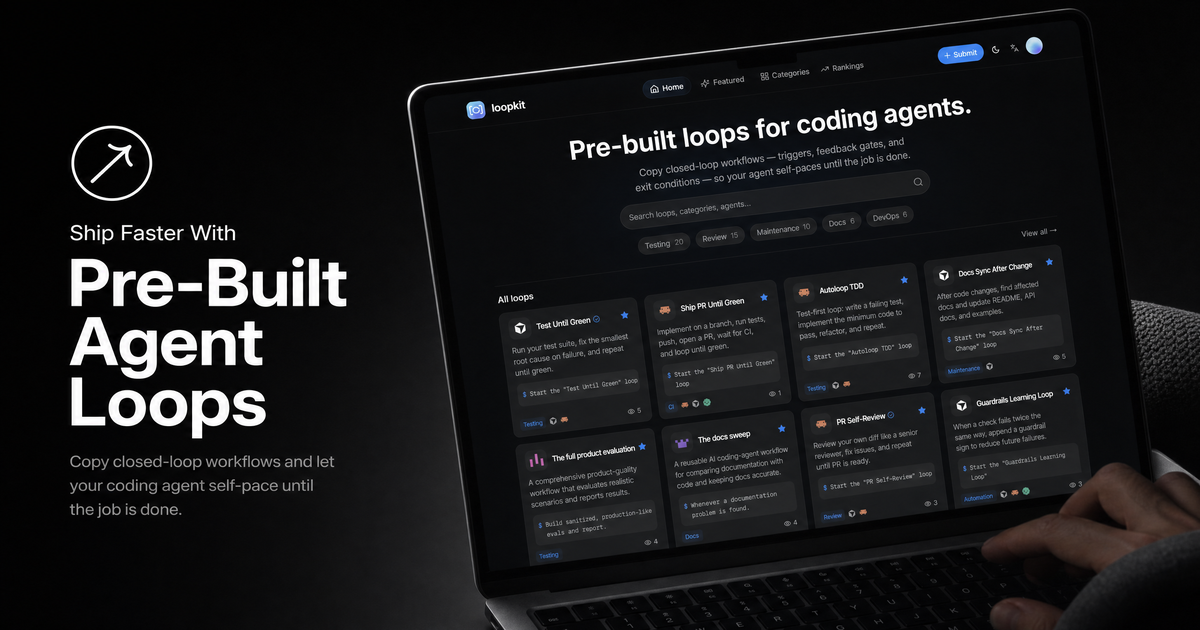
loopkit is a directory of pre-built loops for coding agents. Each agent loop is a closed-loop workflow with a trigger, an action, a feedback gate that checks the work, and an exit condition, so an agent such as Claude Code, Cursor or Codex keeps iterating on its own until the goal is reached instead of stopping after one pass.
The library is organized into categories including testing, review, maintenance, docs, DevOps, debugging, CI, quality, planning, performance, automation and Git. Most loops are prompt-only: you copy a kickoff prompt and paste it into your agent. A few, such as a post-edit test guard, come with hook files for Claude Code and Cursor that enforce the loop automatically. Browsing and copying loops is free with no signup, and users can submit their own loops for review.
Who it's for
- Developers using Claude Code, Cursor or Codex
- Engineers automating testing and CI fixes
- Teams standardizing code review and docs upkeep
- Practitioners of loop engineering for AI agents
How to use loopkit
- 1
Browse the loop library
Search or filter by category, such as Testing, CI, Review or Debugging, to find a loop that fits your task.
- 2
Copy the kickoff prompt
Click Use loop and copy the plain-text kickoff prompt. Some loops offer deeplinks that open Cursor or Claude Code with the prompt already filled in.
- 3
Run it in your coding agent
Paste the prompt into Claude Code, Cursor, Codex or a terminal agent. The agent runs checks between passes, fixes issues and stops when the exit condition is met.
- 4
Install hooks for persistent loops (optional)
For hook-based loops, extract the provided .claude/ or .cursor/ files at your project root so the loop runs automatically, for example re-running tests after every edit.
loopkit key features
Closed-loop workflows with feedback gates and exit conditions
Every loop defines a trigger, a verification step between passes and a clear stopping point, and lists its guardrails up front.
Works with Claude Code, Cursor and Codex
Kickoff prompts are plain text that work in any coding agent, and each loop lists the agents it is compatible with.
Hook-based loops
Selected loops ship install bundles with config for both Claude Code and Cursor, such as a post-edit test guard or a pre-commit guard.
Categorized loop library
Loops are grouped into categories such as testing, review, maintenance, docs, DevOps, debugging, CI, quality, planning, performance, automation and Git, with featured and ranking views.
Community submissions
Users can paste a loop or import one from a GitHub repo containing a loopkit.json manifest; submissions are reviewed before going live.
loopkit use cases
Running a Claude Code loop until tests pass
Use loops like Test Until Green or Autoloop TDD so the agent fixes failures and re-runs the suite until everything passes.
Getting CI and pull requests to green
Loops such as Fix CI Until Green and Ship PR Until Green reproduce failed CI runs, apply fixes and repeat until checks pass.
Self-review and quality checks
Run PR Self-Review, accessibility repair or UI/UX scoring loops to review work repeatedly against a fixed checklist before shipping.
Keeping documentation in sync
Docs-focused loops compare documentation with the current code, update stale content and open a reviewable pull request.
How loopkit is built
loopkit is built on the ShipAny TanStack template, which provides ready-made user sign-in that the site uses for accounts and loop submissions. Since all loops are free and the site mentions optional tips, ShipAny's built-in payment support is available for that kind of contribution.
View the ShipAny TanStack templateloopkit FAQ
What is loopkit?
loopkit is a directory of pre-built loops for coding agents. Each loop is a closed-loop workflow with a trigger, feedback gate and exit condition that lets an agent iterate until the task is complete.
Is loopkit free?
Yes. All loops are free to browse, copy and run with no signup required. Tips are optional and nothing is paywalled.
How is an agent loop different from a prompt?
A prompt runs once and you check the result yourself. An agent loop adds a verification gate and an exit condition, so the agent keeps going until the goal is met.
What is loop engineering?
Loop engineering means designing the loops that drive your AI coding agent instead of prompting it step by step: you define a goal and a verification step, and the agent iterates until the stopping condition passes.
How do I make a Claude Code loop run until tests pass?
Copy a testing loop's kickoff prompt and let Claude Code self-pace, or use a hook-based loop that relies on a Claude Code Stop hook or the /goal command to re-run tests after each turn until they pass.
Can I use loopkit loops with Cursor and Codex?
Yes. Kickoff prompts are plain text and work in Cursor, Codex, Claude Code or terminal agents, and hook-based loops include both .cursor/ and .claude/ config.
This introduction is based on the public pages of loopkit.net, read on October 9, 2026.