What is MCP.so?
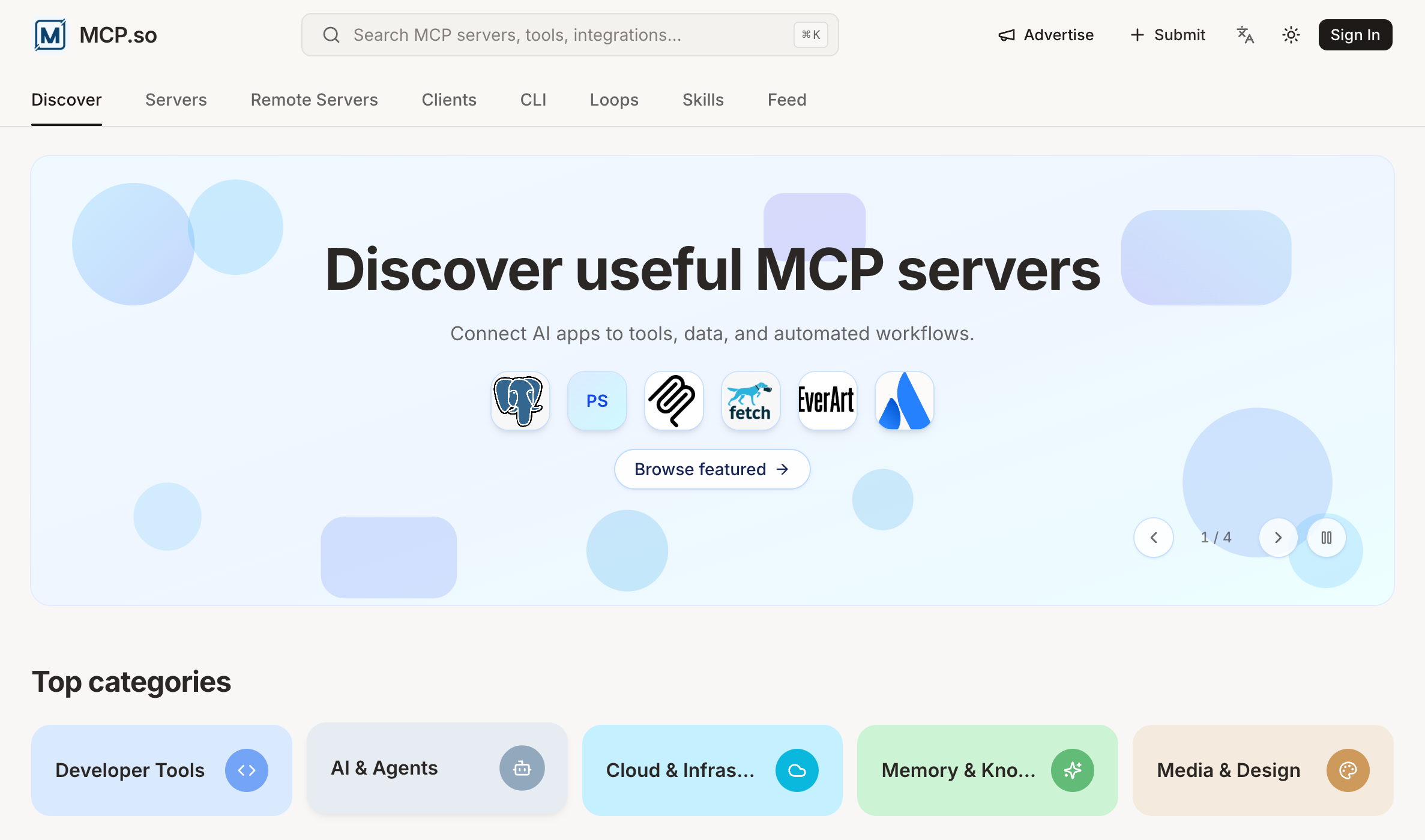
MCP.so is a community-driven directory where people discover useful MCP servers, along with MCP clients, remote MCP servers, CLI tools, agent skills and reusable loops. It presents itself as an MCP marketplace for linking AI apps such as Claude, ChatGPT, Cursor and VS Code to outside tools, data and automated workflows. The site gathers third-party MCP servers in one place so users can search for them, compare them and learn about them.
Users can search by name, category, tag, runtime or integration. They can also browse top categories, including Developer Tools, AI & Agents, Cloud & Infrastructure, Memory & Knowledge, and Media & Design. The homepage has sections for featured picks, servers trending this week and new arrivals. Each skill page shows the source repository, an install command and a summary of what the skill does. Developers can submit their own MCP servers to the directory.
Who it's for
- Developers connecting AI assistants to external tools
- Users of Claude, ChatGPT, Cursor or VS Code
- MCP server and client authors
- Teams building AI agent workflows
How to use MCP.so
- 1
Search the directory
Use the search bar (⌘K) to look up MCP servers, tools or integrations by name, or pick one of the top categories.
- 2
Browse by type
Use the navigation to switch between Servers, Remote Servers, Clients, CLI, Loops, Skills, Agents and the Feed.
- 3
Open a listing
Open an entry to read its description, author, repository and details. Skill pages also include an install command, such as an npx skills add line.
- 4
Submit your own server
Click Submit in the navigation bar, or open an issue in the MCP.so GitHub repository, and include your server's name, description, features and connection details.
MCP.so key features
Searchable MCP server list
Find MCP servers by name, category, tag, runtime or integration. Popular, featured and newly published projects are all listed.
MCP clients and remote MCP servers
Browse apps, IDEs and frameworks that support MCP, plus hosted remote servers that you connect to without installing anything locally.
Agent skills with install commands
Skill pages show the source repository, the category, a one-line install command and a breakdown of what the skill does.
CLI tools and loops for coding agents
Official and agent-ready command-line tools are collected alongside reusable loops, such as running a build or CI check repeatedly until it passes.
Trending and new arrivals
Homepage sections show what the community is installing this week and which servers were published recently.
Tags for the MCP store
Tags group listings by use case, such as search, databases, GitHub, browser automation, memory and cloud services.
MCP.so use cases
Connecting Claude or Cursor to data sources
Find an MCP server that gives an AI assistant access to files, databases, search or APIs that you already use.
Comparing awesome MCP servers and clients
Look at featured servers next to compatible MCP clients and IDEs before choosing a setup.
Extending coding agents
Find agent skills, CLI tools and loops to add to coding agent workflows, such as planning, debugging and running checks until they pass.
Listing a new MCP server
Authors can submit their MCP server so other people can find it in the directory.
How MCP.so is built
MCP.so is built on the ShipAny TanStack template. Its visible user features, such as sign-in, submitting listings and sponsorship slots, fit the authentication and account features that ShipAny provides ready-made.
View the ShipAny TanStack templateMCP.so FAQ
What is MCP.so?
MCP.so is a community-driven platform that collects and organizes third-party MCP servers. It also lists MCP clients, CLI tools, agent skills and loops, so users can discover and learn about them.
What are MCP servers?
According to the site, an MCP server supplies context, tools and prompts to AI clients. It can expose resources such as files, databases and API integrations through the Model Context Protocol, an open protocol developed by Anthropic.
How do I find MCP servers on MCP.so?
Use the search bar or browse by category, tag, runtime or integration. The homepage also shows featured, trending and newly added servers.
How do I submit my MCP server to MCP.so?
Click Submit in the navigation bar or open an issue in the MCP.so GitHub repository. Include the server's name, description, features and connection details.
Does MCP.so list MCP clients and remote MCP servers?
Yes. MCP.so has separate sections for MCP clients, such as apps, IDEs and frameworks that support MCP, and for remote MCP servers.
Can I find agent skills on MCP.so?
Yes. The Skills section lists reusable agent skills, including Claude and Codex skills. Each skill page shows its repository and an install command.
This introduction is based on the public pages of mcp.so, read on October 9, 2026.