What is Grok Bot Templates?
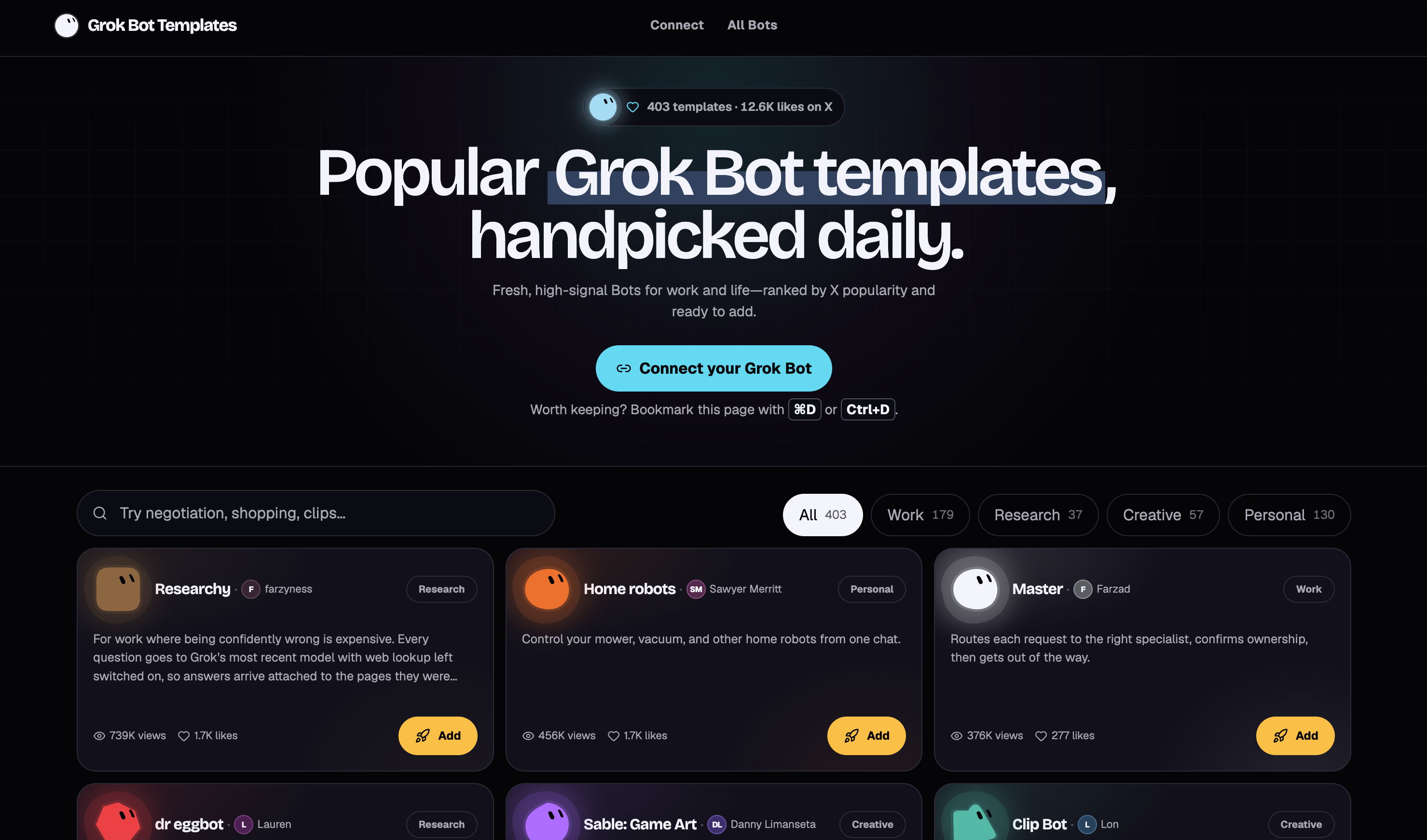
Grok Bot Templates is an independent directory that gathers public Grok Bot templates into one searchable Grok Bot Marketplace. The supplied homepage lists 1,938 Bots across Work, Research, Creative, and Personal categories, with official listings and community-shared templates available to browse. Visitors can search by name, creator, or category, inspect a listing’s description and public source, and follow its add link to Grok. The site describes its collection as handpicked daily and states that it is not affiliated with xAI.
The directory separates official marketplace listings from rankings based on X engagement. Popularity signals retain their source and capture time, and the site explicitly distinguishes post views from Bot installations or demonstrated quality. A card opens a detail page for review, while the add action hands the shared template to Grok desktop; a public x.ai page provides a fallback. A separate connection prompt lets an existing Bot check the directory daily for relevant suggestions while tracking previously shown Bot slugs.
Who it's for
- Grok users looking for task-specific Bots
- Professionals comparing work and research templates
- Creators browsing art and media workflows
- Individuals exploring everyday assistance
How to use Grok Bot Templates
- 1
Search for a task
Search by Bot name, creator, or category. Use the Work, Research, Creative, and Personal filters to narrow the collection.
- 2
Compare listings and sources
Choose a source filter or sort by X popularity, likes, or latest entries. Open a card to review the Bot’s job, boundaries, and public x.ai destination.
- 3
Open the template in Grok
Choose Add to Grok desktop to open the shared template while keeping the directory available. If the desktop handoff fails, use View on x.ai.
- 4
Adapt the Bot
Review and adjust the template’s instructions, tone, tools, and approval rules around the intended workflow. Refine its instructions after trying an initial task.
Grok Bot Templates key features
Searchable template collection
The directory supports discovery by name, creator, and category, with separate sections for work, research, creative tasks, and personal use.
Official Grok Bot Marketplace filter
Official marketplace listings can be browsed separately from the wider collection and its X popularity rankings.
Popular Grok Bot templates
X views and likes provide dated discovery signals. The directory preserves their provenance and does not present these figures as install counts.
Template review and add links
Listings provide descriptions, dedicated detail pages, and public x.ai sources. Desktop add links open the corresponding shared template in Grok.
Connect your Grok Bot
A copyable prompt asks an existing Bot to consult the connection page daily, suggest relevant Bots, and track previously suggested slugs to avoid repeats.
Latest listings
A latest section and sorting option help visitors discover recently added entries alongside established listings.
Grok Bot Templates use cases
Find work and research starting points
Visitors can compare listed Bots for research with cited sources, project coordination, or meeting preparation before reviewing their templates in Grok.
Explore creative workflows
Creative listings include templates described as handling game art, podcast clips, and video transcription. The directory helps users locate and inspect these starting points.
Browse everyday assistance
Personal listings cover tasks such as household follow-ups, calendar planning, fishing guidance, and golf preparation.
Receive recurring discovery suggestions
Users can give the connection prompt to an existing Grok Bot so it looks for relevant templates each day and keeps track of earlier suggestions.
How Grok Bot Templates is built
The submitter identifies ShipAny TanStack as the template used to build the directory. The visible pages establish a browsing and referral workflow, but do not establish whether ShipAny’s ready-made authentication, payments, subscriptions, or credits are enabled.
View the ShipAny TanStack templateGrok Bot Templates FAQ
What is Grok Bot Templates?
It is an independent directory of public Grok Bot templates for work and personal tasks. It brings official and community listings into a searchable collection and is not affiliated with xAI.
How do users add Grok Bot templates?
Open a listing and choose Add to Grok desktop to review the shared template in the app. View on x.ai is the fallback when the desktop link does not open.
How are popular Grok Bot templates ranked?
The directory uses dated engagement from traceable X posts as an initial discovery signal. Views and likes do not establish installation counts, safety, or effectiveness.
Does the directory include the official Grok Bot Marketplace?
It includes public official marketplace listings and provides a separate way to browse them. The directory itself remains independent of xAI.
How can users choose the best Grok Bot templates for a task?
The site advises choosing a specific desired result, then reviewing the template’s tools, boundaries, and approval requirements. Users can adjust the template after adding it and refine its instructions after the first task.
How does the “Connect your Grok Bot” prompt work?
The prompt instructs an existing Bot to visit the connection page daily and find templates relevant to its user. It also asks the Bot to retain previously shown slugs so suggestions are not repeated.
This introduction is based on the public pages of gtemplate.net, read on October 9, 2026.