
What is Seed Music?
Seed Music is an AI music generator that runs in the browser. It handles text to music from a plain-language prompt, lyrics to song when you already have words written, and instrumental tracks for non-vocal projects. Before generating, you set a title and a style of music so the result stays closer to your brief, then you listen to the draft, refine it and download the audio.
The product keeps prompt writing, lyric entry, instrumental drafting, preview and download in one place, so you can test a musical idea without opening a DAW. Music is the main workflow, but the same workspace also offers AI Video and AI Image, which lets a finished song carry on into cover art, teaser scenes or other release material. Generation uses credits, and paid plans are offered.
Who it's for
- Songwriters testing lyrics and choruses
- Short-form video creators
- Podcasters needing intros and cues
- Brands and marketers drafting audio
- Musicians sketching ideas before production
How to use Seed Music
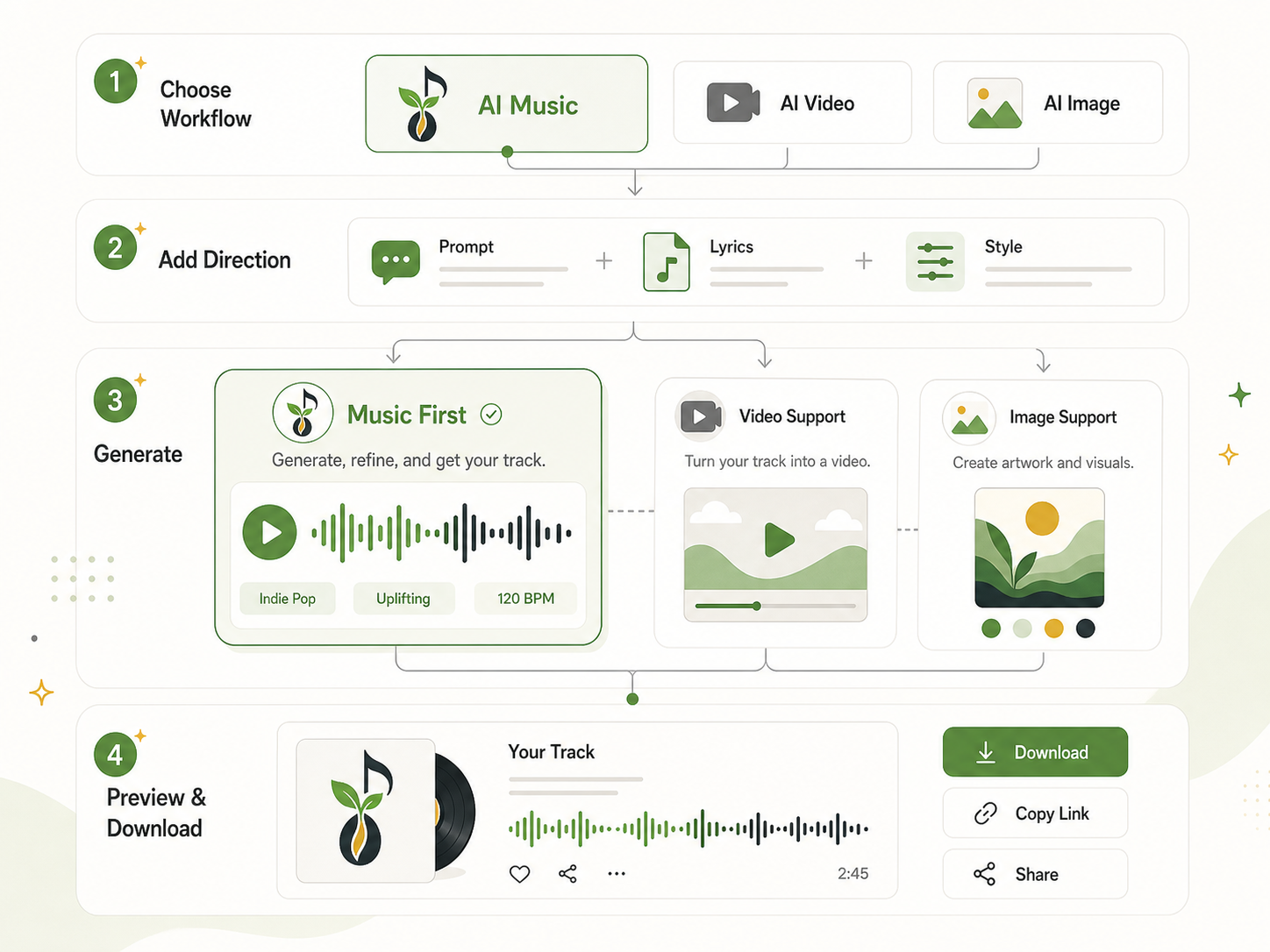
- 1
Pick the AI Music workflow
Start with AI Music when the track comes first. AI Video and AI Image are available in the same workspace for later steps.
- 2
Add a prompt, lyrics and style
Write a prompt or paste your own lyrics, set a title, and describe the genre, mood, tempo and intended use to steer the result.
- 3
Generate and refine
Create the track, listen against your brief, and adjust the prompt or rewrite lyrics until the sound direction is right.
- 4
Preview and download
Keep the draft you like, download the audio, and reuse the same direction for edits, covers, teasers or release assets.
Seed Music key features
Text to music from a prompt
Describe genre, mood, theme, tempo and use case in plain language to get a first-pass song draft you can listen to.
Lyrics to song
Paste custom lyrics to hear them as a song, useful for chorus tests, songwriter demos and revisions built around your own lines.
Instrumental music generator
Switch to instrumental mode for non-vocal tracks such as podcast intros, product video music, demo soundtracks and brand cues.
Style control before generating
Title and style-of-music inputs let you steer each run with direction cues instead of relying on a single loose prompt.
One browser workflow
Writing, generation, preview and download happen in one browser workspace, which cuts down on switching between tools.
Video and image extensions
Once a song works, the same concept can be carried into AI-generated video scenes or image artwork for covers and teasers.
Seed Music use cases
AI music for Shorts and Reels
Generate hooks, background tracks and first-pass music directions for Shorts, Reels, teaser edits and creator posts.
Songwriter demos
Turn finished lyrics into a song draft to judge a chorus or arrangement before investing in full production.
Podcast and brand audio
Draft instrumental intros, cues and background music for podcasts, product videos and brand content.
Release preparation
Take a strong music draft into cover art, teaser concepts and launch materials without rebuilding the idea from scratch.
How Seed Music is built
Seed Music runs on the ShipAny Two template, which supplies the ready-made user accounts, payments and credit system behind its credit-based generation and its pay-as-you-go, monthly and annual plans.
View the ShipAny Two templateSeed Music FAQ
What is Seed Music?
Seed Music is a browser-based AI music generator that creates song drafts from text prompts or custom lyrics, plus instrumental tracks. You can preview and download the audio once it is generated.
Is Seed Music a free AI music generator online?
The site presents itself as a free AI music generator online, but generation uses credits and paid plans are offered. Check the pricing page for current options.
How do I turn lyrics into a song with Seed Music?
Paste your lyrics into the generator, set a title and style of music, then generate. Listen to the draft and refine or rewrite the lyrics if the result misses your brief.
Can I use Seed Music as an instrumental music generator?
Yes. An instrumental mode produces non-vocal tracks for uses such as podcast intros, product videos and background music.
Can I control genre, mood or tempo?
Yes. You can describe genre, mood, tempo and use case in your prompt and set a title and style of music before generating.
Does Seed Music only handle music?
No. Music is the main workflow, but the same workspace also offers AI Video and AI Image for visuals that go with a track.
This introduction is based on the public pages of seedmusic.im, read on October 9, 2026.