What is Seed Audio AI?
Seed Audio AI is a web-based AI text to audio generator powered by Seed Audio 1.0, a text to audio AI model. Instead of producing only a narrated voice, it takes one written scene description and returns a combined result that can include multi-speaker dialogue, background music, environmental ambience and sound effects, already mixed together. Users can preview the generated audio in the browser and download it.
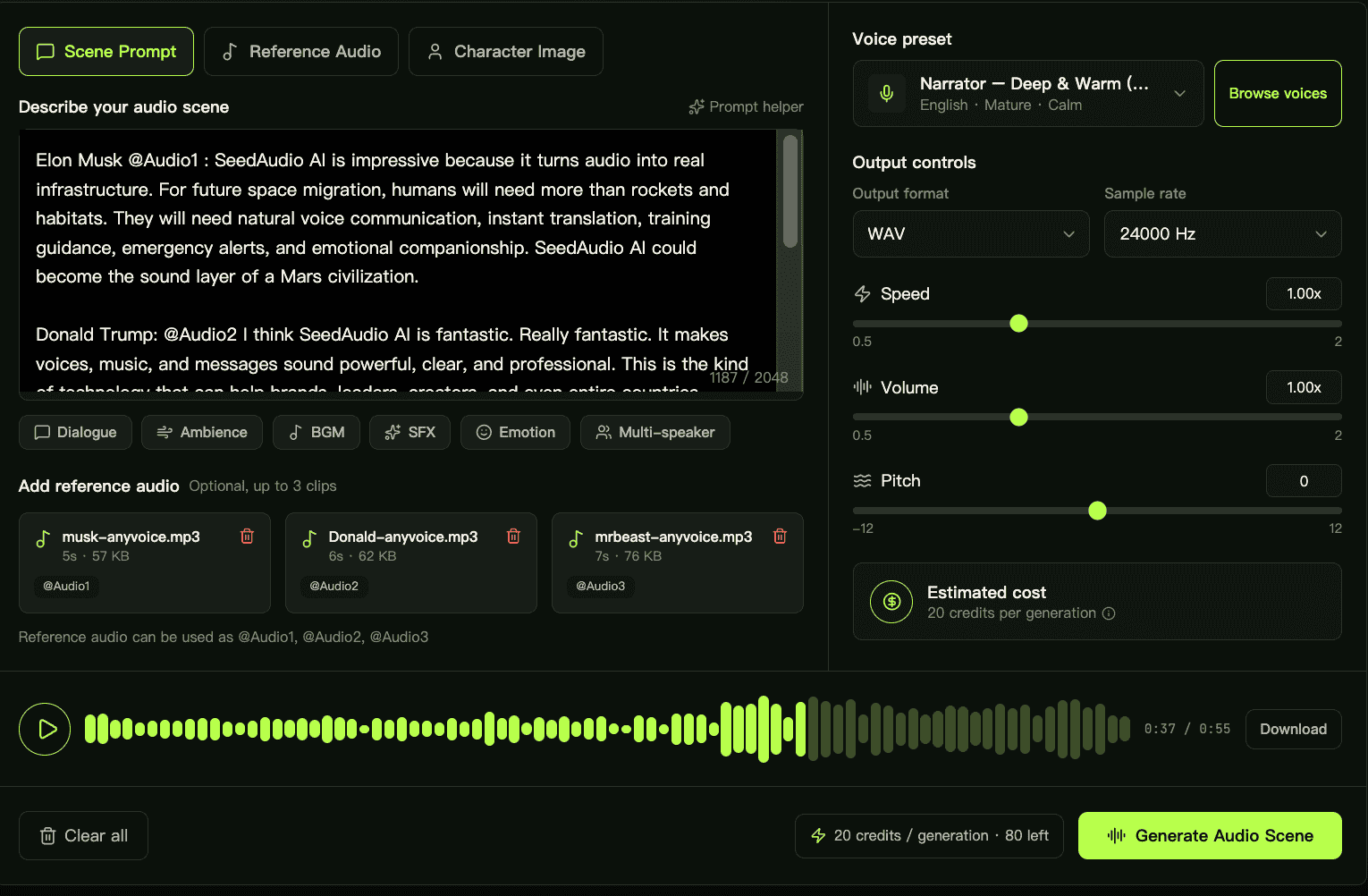
The difference from a standard text-to-speech tool is that the prompt to audio workflow covers the whole scene: speakers, emotion, setting, music and effects are described in one place. Optional reference audio clips, a character image and voice presets help keep voices consistent, while output controls let users choose the file format, sample rate, speed, volume and pitch. The site also states that the model can be integrated via API.
Who it's for
- Video creators and editors
- Podcast producers
- Marketers testing campaign audio
- Game and app designers
- Product and creative teams
How to use Seed Audio AI
- 1
Describe the scene
Write a prompt covering who speaks, the emotion, the setting, and the music and sound effects you want. A prompt helper and tags such as Dialogue, Ambience, BGM, SFX and Multi-speaker are available.
- 2
Add references and a voice (optional)
Upload up to three reference audio clips, add a character image, or pick a voice preset to steer the voices.
- 3
Set output options
Choose a format (MP3, WAV, PCM or OGG Opus), a sample rate, and adjust speed, volume and pitch.
- 4
Generate and download
Generate the audio scene, preview it on the page, then export it for video, podcasts, games or ads.
Seed Audio AI key features
Text to audio generation in one pass
Dialogue, music, ambience and sound effects are generated together from a single prompt so the layers stay in sync.
Multi-speaker dialogue
Several characters with distinct voices can be defined in one prompt.
Emotion and performance control
Prompts can guide tone, pacing, pauses, laughter, accents and dialects.
AI music generator and AI sound effect generator layers
Background music, environmental ambience and Foley-style effects are added inside the same scene rather than sourced separately.
Reference audio and voice consistency
Reference clips or an image can be used to keep character voices consistent across longer content.
Flexible export and API access
Multiple audio formats and sample rates are offered, and the site says the text to audio AI model is available via API.
Seed Audio AI use cases
AI audio generator for video sound design
Add generated music, transitions, ambience and impact layers to short-form video projects.
Podcast and voice content
Create intros, spoken-word beds and ambient texture for podcasts and narrated content.
Marketing campaign audio
Try several audio directions for a campaign concept from one brief before final production.
Game and app prototypes
Draft NPC dialogue, UI sound direction and environment layers for prototypes.
How Seed Audio AI is built
Seed Audio AI is built on the ShipAny Two template. Its sign-up with free starter credits, per-generation credit cost, pay-as-you-go credit packs and monthly or annual subscriptions map onto the authentication, payments, subscriptions and credits system that ShipAny provides out of the box.
View the ShipAny Two templateSeed Audio AI FAQ
What is Seed Audio AI?
Seed Audio AI is an online AI text to audio generator based on the Seed Audio 1.0 model. It turns a written scene description into audio that can include dialogue, music, ambience and sound effects.
Is Seed Audio AI free?
New users can get free credits to try it. Ongoing use is covered by paid credit packs or monthly and annual subscriptions, and each generation consumes credits.
How is Seed Audio 1.0 different from text to speech?
Text to speech reads text aloud, while Seed Audio 1.0 generates a full scene with multiple speakers, emotional delivery, background music, ambience and effects in a single take.
How do I turn a prompt to audio with Seed Audio AI?
Describe the speakers, mood, setting, music and effects in the prompt box, optionally add reference audio or a voice preset, choose output settings, and click generate. The result can be previewed and downloaded.
Can Seed Audio AI keep a character's voice consistent?
Yes. The site says reference audio or an image can be used to keep character voices consistent across long-form content.
Does the text to audio AI model have an API?
The site states that the Seed Audio text to audio model can be integrated into products via API and that its output is intended for commercial use.
This introduction is based on the public pages of seedaudio-ai.org, read on October 9, 2026.