
What is NanoBananaTool?
NanoBananaTool is a web-based Nano Banana tool for text-driven image editing and AI-generated images. Instead of working with layers and brushes, users write a description of what they want and the AI applies the change. It offers a Text to Image mode for creating images from scratch and an Image to Image mode for editing uploaded pictures, with the goal of high-fidelity image editing that keeps characters consistent.
Users can upload up to six reference images in JPG, PNG or WebP format, each under 5 MB, and the AI combines elements from them into one result. A generation typically takes 30 to 60 seconds. The site also includes Banana Agent, a chat-based assistant that produces images and videos through conversation, and Banana Prompts, a library of example prompts. Generated images may be used commercially, and uploads are not used for model training.
Who it's for
- Illustrators and concept artists
- Indie game developers
- YouTubers and thumbnail designers
- E-commerce sellers
- Marketers and brand designers
How to use NanoBananaTool
- 1
Pick a mode
On the homepage generator, choose Text to Image to create something new or Image to Image to edit an existing picture.
- 2
Add reference images
Upload up to six reference images (JPG, PNG or WebP, under 5 MB each). Uploading does not use credits.
- 3
Describe the edit
Write a prompt of up to 2,000 characters explaining the change or the scene you want. Banana Prompts has examples if you need ideas.
- 4
Generate and reuse
Run the generation, then share or download the result, or use it as a reference for another round.
NanoBananaTool key features
Text-driven image editing
Images are edited by describing the change in plain language rather than with manual editing tools.
Multi-image fusion
Up to six reference images can be combined so the AI blends their elements into one output.
Character consistency
Aimed at keeping the same character recognizable across different scenes and styles.
Banana Agent
A chat-based assistant that creates images and videos through multi-turn conversation on a visual canvas.
Banana Prompts library
A collection of example prompts to help users get started.
Commercial use and privacy
Generated images can be used commercially; uploads are stored encrypted and not used for model training.
NanoBananaTool use cases
Style transformations
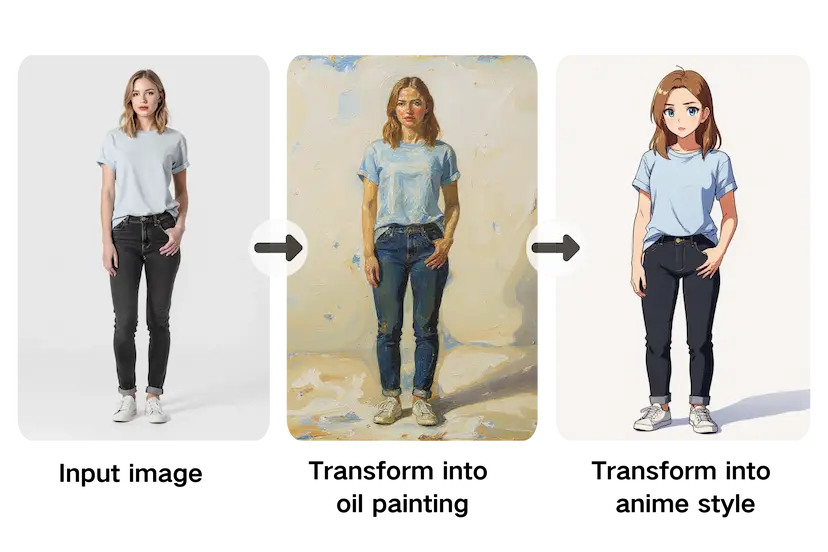
Turn a photo into an oil painting, anime illustration or another style with a single prompt.
Game and story characters
Place one character into new scenes for sprites, mockups or book illustration references.
Video thumbnails
Combine frames from a video with a description to make thumbnail images.
Product mockups
Create lifestyle-style product images for online stores from existing product photos.
NanoBananaTool FAQ
What is NanoBananaTool?
NanoBananaTool is an online Nano Banana AI image editor and generator. You describe the change you want in text, optionally add reference images, and it produces a new image.
Is NanoBananaTool free?
New users get free credits to try it, and paid plans and credit packs are available for more generations. Credits are refunded automatically if a generation fails for technical reasons.
How do I do text-driven image editing with NanoBananaTool?
Choose Image to Image, upload the picture you want to change, describe the edit in the prompt box and start the generation. Results usually arrive within 30 to 60 seconds.
How does multi-image fusion work?
You can upload up to six reference images, and the AI combines their visual elements based on your prompt into a single image.
Can I use AI-generated images from NanoBananaTool commercially?
Yes. The site says generated images belong to the user and can be used for commercial projects, as long as the reference images and prompts don't infringe others' copyrights.
Is my uploaded data private?
According to the site, uploads are encrypted, are not used for model training or shared with third parties, and can be deleted by the user.
This introduction is based on the public pages of nanobananatool.com, read on October 9, 2026.