
Supabase
Supabase is a cloud database development platform built around PostgreSQL. It provides backend services including database, authentication, realtime subscriptions, file storage, and edge functions, and exposes PostgreSQL capabilities via RESTful and GraphQL APIs—so you don’t need to build your own backend from scratch.
In ShipAny projects, you can use Supabase to store and manage your data.
Quick Start
Follow the steps below to integrate Supabase into your ShipAny project.
Go to the Supabase website and register a Supabase account.
Then open the Supabase Dashboard and create a project.
Enter the project name, click Generate a password to generate a random password, then click Copy to copy the password.

On the project page, click Connect at the top, switch to ORMs -> Drizzle, and copy the DATABASE_URL value.
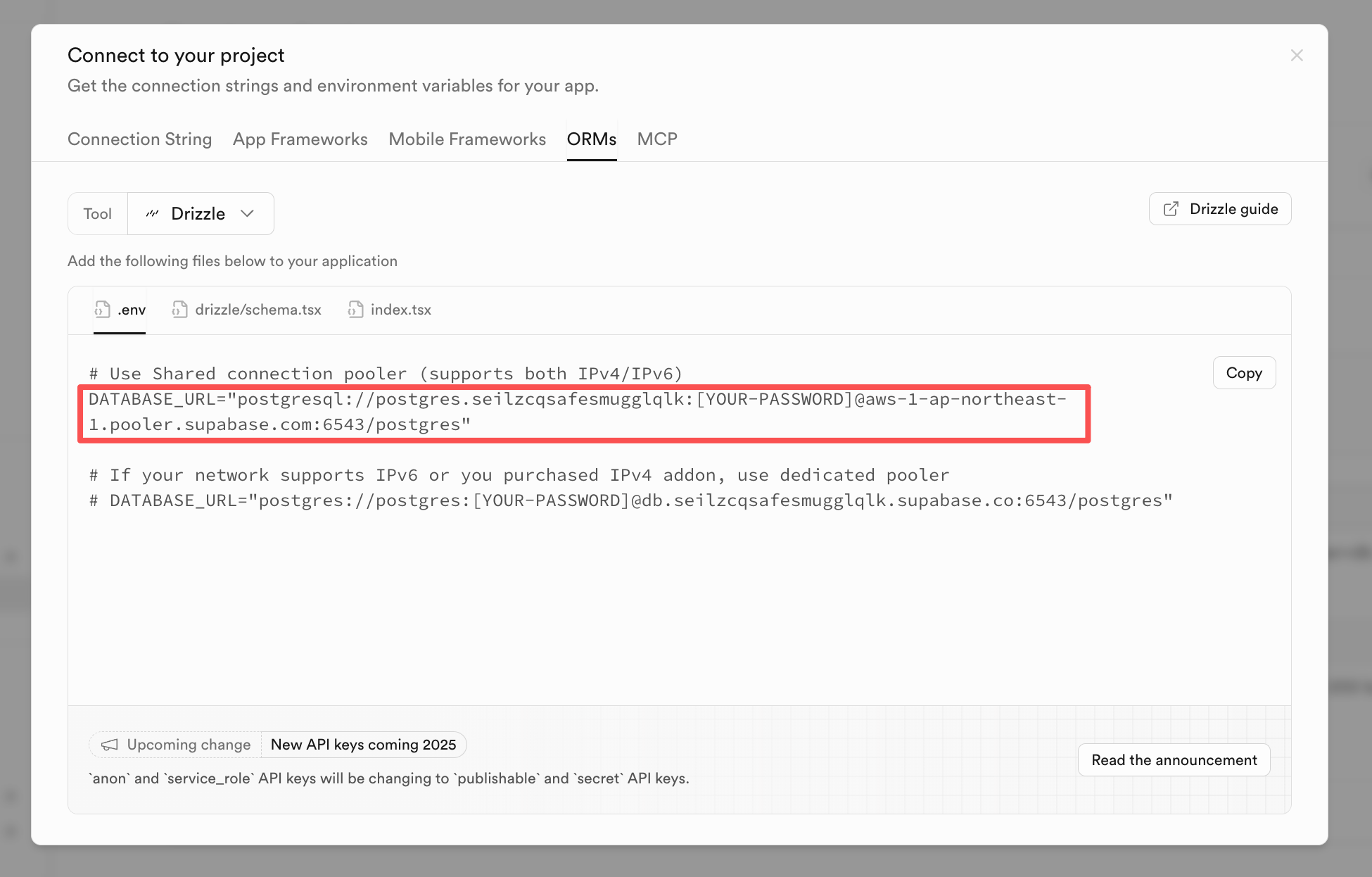
Replace [YOUR-PASSWORD] with the random password you generated in the previous step to get your Supabase project DATABASE_URL, for example:
postgresql://postgres.seilzcqsafesmugglqlk:[email protected]:6543/postgresUse psql to test whether you can connect to the database:
psql "postgresql://postgres.seilzcqsafesmugglqlk:[email protected]:6543/postgres"Please look up how to install
psqlon your system. In most cases, installingPostgreSQLlocally also installspsql.
Copy the DATABASE_URL from the previous step.
In your project environment variable files, fill in the Supabase database configuration:
- Local development:
.env.development - Production:
.env.production - Cloudflare Workers:
wrangler.toml
DATABASE_PROVIDER = "postgresql"
DATABASE_URL = "supabase-database-url"
DB_SCHEMA_FILE = "./src/config/db/schema.postgres.ts"
DB_MIGRATIONS_OUT = "./src/config/db/migrations"- DATABASE_PROVIDER: Required. Fixed value
postgresql - DATABASE_URL: Required. Your Supabase
DATABASE_URL - DB_SCHEMA_FILE: Required. Fixed value
./src/config/db/schema.postgres.ts - DB_MIGRATIONS_OUT: Optional. Output path for migration files. Default is
./src/config/db/migrations. You can choose different output paths based on database type.
Using Supabase database, the data table structure is defined in the ./src/config/db/schema.postgres.ts file, you need to export the data table from this file.
Open ./src/config/db/schema.ts file, modify the content to:
export * from './schema.postgres';Run the following commands to migrate your database tables:
pnpm db:generate
pnpm db:migrateYou can manage your database in the Supabase Dashboard, or run the following command locally:
pnpm db:studioThis will open the database admin panel.
Customization
Update tables
If you need to add new tables or modify table columns, edit ./src/config/db/schema.postgres.ts to update the schema.
After making changes, run the following commands to generate and apply migrations:
pnpm db:generate
pnpm db:migrate
Update database connection
If you need to adjust connection parameters (e.g., custom options, connection pooling, etc.), update the logic in ./src/core/db/postgres.ts.
By default, data operations use the db() instance exported from ./src/core/db/index.ts. Its return type is any, so in some cases you may not get good type hints.
import { db } from '@/core/db';
import { user } from '@/config/db/schema';

const [result] = await db().select().from(user).limit(1);
If you want a strongly typed database instance, you can use the following approaches when operating on data:
import { dbPostgres } from '@/core/db';
import { user } from '@/config/db/schema';

const [result] = await dbPostgres().select().from(user).limit(1);
Or:
import { getPostgresDb } from '@/core/db/postgres';
import { user } from '@/config/db/schema';

const [result] = await getPostgresDb().select().from(user).limit(1);
Deploy to Cloudflare Workers
Supabase works on Cloudflare Workers, and it also supports using Hyperdrive to accelerate database access.
For Hyperdrive configuration, see: Configure Hyperdrive.
Example wrangler.toml snippet for deploying to Cloudflare Workers with Supabase:
[[hyperdrive]]
binding = "HYPERDRIVE"
id = "your-hyperdrive-config-id"
localConnectionString = "postgresql://xxx:[email protected]:6543/postgres"

[vars]
DATABASE_PROVIDER = "postgresql"
DATABASE_URL = "postgresql://xxx:[email protected]:6543/postgres"
Use Schema to isolate data
Supabase charges $10/month for each new project. If you have many projects, you can consider reusing the same Supabase project and isolating data through Schema.
Supabase uses public as the default Schema. In the same Supabase project, you can create multiple Schemas to store data for different projects.
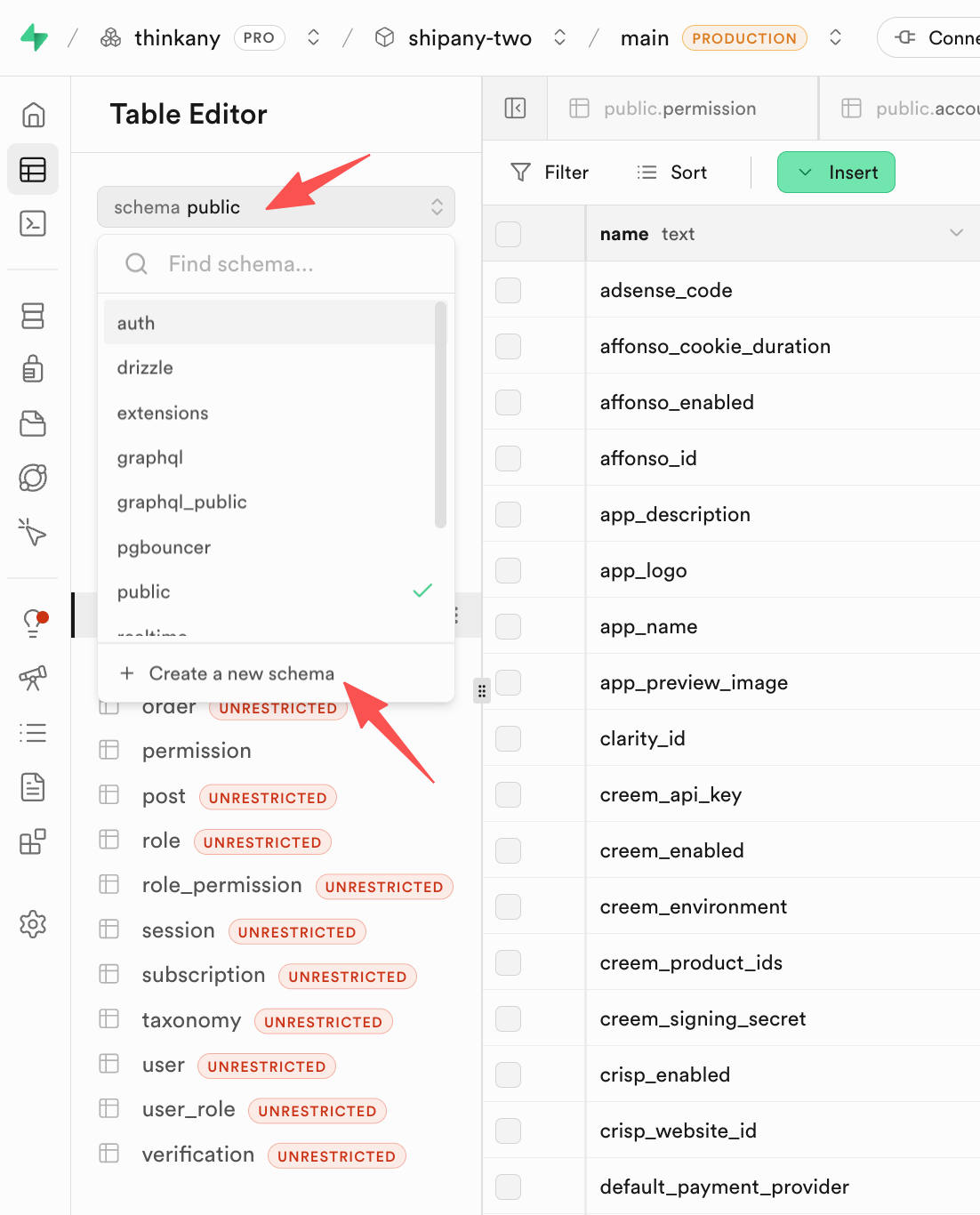
Go to the Table Editor page of your Supabase project, click the schema dropdown menu, click Create a new schema, enter Schema name to create a custom Schema.
For example, create a Schema named project_2.
In the environment variable file of the new project, fill in the Supabase database configuration:
- Local development:
.env.development - Production:
.env.production - Cloudflare Workers:
wrangler.toml
# supabase
DATABASE_PROVIDER = "postgresql"
DATABASE_URL = "postgresql://xxx:xxx.pooler.supabase.com:6543/postgres"

DB_SCHEMA_FILE = "./src/config/db/schema.postgres.ts"
DB_MIGRATIONS_OUT = "./src/config/db/migrations_project_2"
DB_SCHEMA = "project_2"
DB_MIGRATIONS_SCHEMA = "project_2"
DB_MIGRATIONS_TABLE = "__drizzle_migrations"- DATABASE_PROVIDER: Required. Fixed value
postgresql - DATABASE_URL: Required. Your Supabase
DATABASE_URL - DB_SCHEMA_FILE: Required. Fixed value
./src/config/db/schema.postgres.ts - DB_MIGRATIONS_OUT: Optional. Output path for migration files. Default is
./src/config/db/migrations. You can choose different output paths based on database type and project name. - DB_SCHEMA: Optional. Database Schema name. Default is
public. Enter the Schema name of the new project to isolate data. - DB_MIGRATIONS_SCHEMA: Optional. Database migration Schema name. Default is
drizzle. Enter the Schema name of the new project to isolate data. - DB_MIGRATIONS_TABLE: Optional. Database migration table name. Default is
__drizzle_migrations. Can be kept unchanged.
Run the following commands to generate and apply migrations:
pnpm db:generate
pnpm db:migrateYou can manage your database in the Supabase Dashboard, switch to the new project's Schema, or run the following command locally:
pnpm db:studioThis will open the database admin panel, switch to the new project's Schema, and manage the tables.