
Admin Settings
ShipAny supports visually modifying configuration items used in the project through the admin dashboard.
Quick Start
Log in to the project management backend, enter the Admin -> Settings panel, find the corresponding configuration item, fill in the configuration value, and you can dynamically update the project configuration.
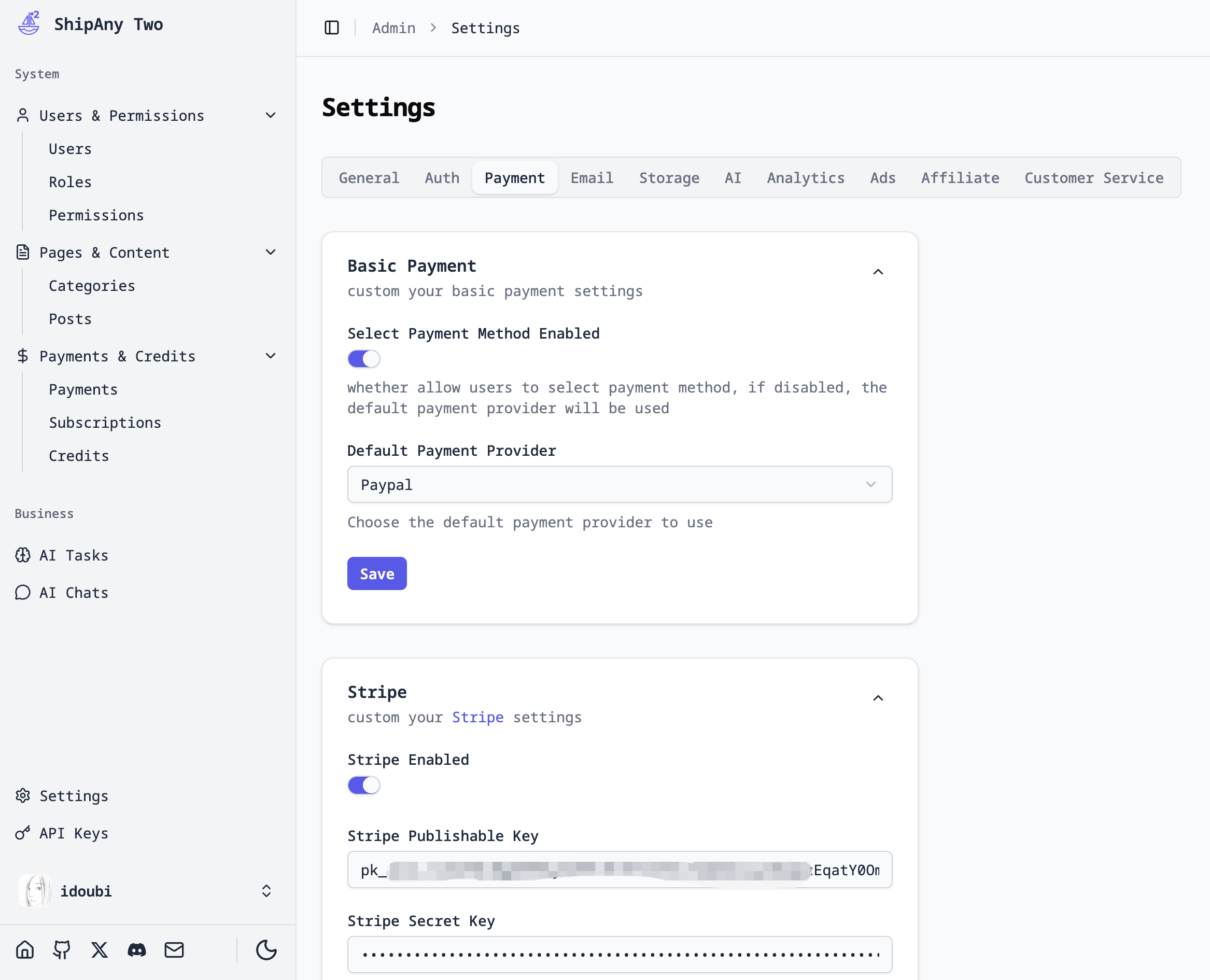
Configuration Items
Configuration items that support visual modification in the project management backend are divided into the following major parts.
General
App Info
app_name: App nameapp_description: App descriptionapp_logo: App Logoapp_preview_image: App preview image
Currently, custom app information is only displayed in the admin dashboard.
Credits Config
initial_credits_enabled: Initial credits switch. If enabled, newly registered users will be given credits.initial_credits_amount: The amount of credits given to newly registered users.initial_credits_valid_days: The validity period of credits given to newly registered users, unit: days.initial_credits_description: Description of credits given to newly registered users.
Authentication
Email Auth
email_auth_enabled: Email authentication switch. If enabled, users can log in using email.
After the system is initialized, email login is enabled by default. You can choose to disable email login after configuring other login methods.
Google Auth
google_auth_enabled: Google login switch. If enabled, users can log in using a Google account.google_one_tap_enabled: Google One Tap login switch. If enabled, users can use Google quick login.google_client_id: Google login Client ID.google_client_secret: Google login Client Secret.
Github Auth
github_auth_enabled: Github login switch. If enabled, users can log in using a Github account.github_client_id: Github login Client ID.github_client_secret: Github login Client Secret.
Payment
Basic Payment
select_payment_enabled: Select payment method switch. If enabled, users can select a payment method when paying.default_payment_provider: Default payment method. If users are not allowed to select a payment method, the default payment method is used.
Stripe Payment
stripe_enabled: Stripe payment switch. If enabled, users can use Stripe for payment.stripe_publishable_key: Stripe payment Publishable Key.stripe_secret_key: Stripe payment Secret Key.stripe_signing_secret: Stripe payment Signing Secret.stripe_payment_methods: Payment methods allowed by Stripe for users to choose.stripe_promotion_codes: Stripe promotion codes.stripe_allow_promotion_codes: Whether to allow users to enter promotion codes.
Creem Payment
creem_enabled: Creem payment switch. If enabled, users can use Creem for payment.creem_environment: Creem payment environment.creem_api_key: Creem payment API Key.creem_signing_secret: Creem payment Signing Secret.creem_product_ids: Creem payment Product ID mapping.
Paypal Payment
paypal_enabled: Paypal payment switch. If enabled, users can use Paypal for payment.paypal_environment: Paypal payment environment.paypal_client_id: Paypal payment Client ID.paypal_client_secret: Paypal payment Client Secret.
Resend
resend_api_key: Resend API Key.resend_sender_email: Resend sender email address.
Storage
Cloudflare R2
r2_access_key: R2 Access Key IDr2_secret_key: R2 Secret Access Keyr2_bucket_name: R2 Bucket Namer2_upload_path: R2 custom upload pathr2_endpoint: R2 upload endpoint addressr2_domain: R2 custom access domain
AI
OpenRouter
openrouter_api_key: OpenRouter API Keyopenrouter_base_url: OpenRouter Base URL
Replicate
replicate_api_token: Replicate API Tokenreplicate_custom_storage: Replicate custom storage switch. If enabled, Replicate will use custom storage.
Fal
fal_api_key: Fal API Keyfal_custom_storage: Fal custom storage switch. If enabled, Fal will use custom storage.
Gemini
gemini_api_key: Gemini API Key
Kie
kie_api_key: Kie API Keykie_custom_storage: Kie custom storage switch. If enabled, Kie will use custom storage.
Analytics
Google Analytics
google_analytics_id: Google Analytics ID.
Clarity
clarity_id: Clarity Analytics ID.
Plausible
plausible_domain: Plausible Analytics Domain.plausible_src: Plausible Analytics Script Source.
OpenPanel
openpanel_client_id: OpenPanel Analytics Client ID.
Vercel Analytics
vercel_analytics_enabled: Vercel Analytics switch. If enabled, the project will use Vercel Analytics for statistics.
Ads
Adsense
adsense_code: Adsense Code.
Affiliate
Affonso
affonso_enabled: Affonso switch. If enabled, the project will use Affonso affiliate marketing.affonso_id: Affonso Affiliate Program ID.affonso_cookie_duration: Affonso Affiliate Cookie Duration, unit: days, default is 30 days.
PromoteKit
promotekit_enabled: PromoteKit switch. If enabled, the project will use PromoteKit affiliate marketing.promotekit_id: PromoteKit Affiliate Program ID.
Customer Service
Crisp
crisp_enabled: Crisp switch. If enabled, the project will use Crisp customer service.crisp_website_id: Crisp Website ID.
Tawk
tawk_enabled: Tawk switch. If enabled, the project will use Tawk customer service.tawk_property_id: Tawk Property ID.tawk_website_id: Tawk Website ID.